
• Skip to main content
  • Skip to primary sidebar
  • Skip to footer
Equalize Digital Home

Equalize Digital

Website Accessibility Consulting, Training, and Development

  • My Account
  • Support
  • Checkout
  • Software
    • Accessibility Checker
      • Features: Accessibility Checker
      • Documentation: Accessibility Checker
      • Buy Accessibility Checker
      • Start Free
    • ArchiveWP
      • Documentation: ArchiveWP
      • Buy ArchiveWP
      • Demo All Plugins
  • Services
    • Accessibility Audits
    • User Testing
    • Accessibility Remediation
    • VPAT & ACR Preparation
    • Accessibility Monitoring
    • Web Accessibility Training
    • Accessibility for Agencies
  • Company
    • About Us
    • Our Team
    • Industry Expertise
    • Accessibility Statement
    • Contact Sales
    • Become An Affiliate
  • Learn
    • Online Courses
    • Accessibility Meetup
    • Articles & Resources
    • Accessibility Craft Podcast
    • Upcoming Events
    • Office Hours
    • Custom Accessibility Training
    • Global Accessibility Awareness Day
  • Contact Sales
  • My Account
  • Support
  • Checkout
Home / Accessibility Checker / Exclude Certain IDs from the Full Site Scanner (edacp_excluded_post_ids)

Exclude Certain IDs from the Full Site Scanner (edacp_excluded_post_ids)

Description

This filter allows you to programmatically exclude specific posts or pages from the Accessibility Checker Pro full site scan. Any post IDs you return will be skipped entirely. They will not be scanned and will not appear in the scan progress counts during a full site scan.

This is useful when certain pages are problematic for the scanner. Common use cases include:

  • Pages which trigger a logout when visited.
  • Very large or complex pages that reliably timeout the scanner and need to be temporarily excluded.

Note: This filter only affects the full site scan. Scanning an individual post or page from the editor is not affected. Excluded posts can still be scanned individually at any time.

This filter requires Accessibility Checker Pro with a valid license.

Usage

add_filter( 'edacp_excluded_post_ids', 'my_excluded_post_ids' );

The edacp_excluded_post_ids filter passes the current array of excluded post IDs. You add any IDs you want to exclude and return the updated array. The exclusions are applied as the full scan post list is assembled and the counts for showing on the page are computed.

When this filter returns a non-empty array, the Full Site Scan page will display a notice in the pre-scan summary listing how many posts are excluded and which IDs, along with the filter name — making it transparent to anyone reviewing the scan that not all content is being checked.
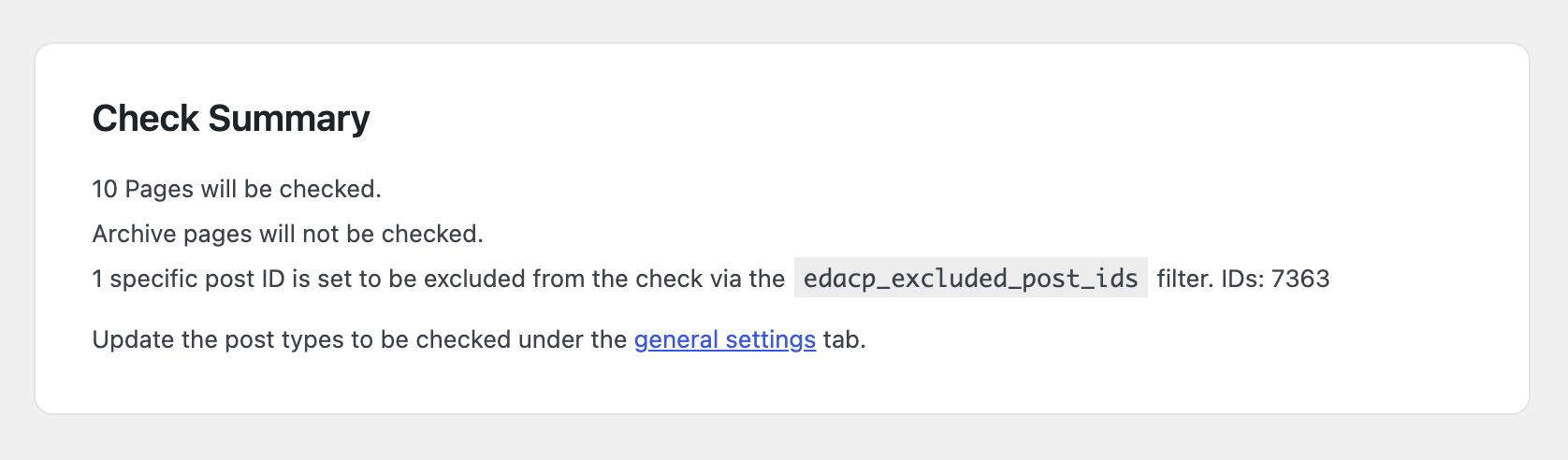
Screenshot of the Accessibility Checker Pro Check Summary section showing a notice that 2 specific post IDs, 1280 and 2594, are set to be excluded from the full site scan via the edacp_excluded_post_ids filter.
When the edacp_excluded_post_ids filter is active, the Check Summary displays a notice listing the number of excluded posts and their IDs before the scan begins.

Parameters

ParameterTypeDescription
$excluded_idsint[]Array of post IDs to exclude from the full site scan. Default is an empty array.

Examples

Exclude posts by ID directly

The simplest usage — pass one or more known post IDs to exclude:

add_filter( 'edacp_excluded_post_ids', function( $excluded_ids ) {
    return array_merge( $excluded_ids, [ 42, 101, 207 ] );
} );

Exclude a page by slug

Use get_page_by_path() to look up a page dynamically when you don’t want to hardcode the post ID:

add_filter( 'edacp_excluded_post_ids', function( $excluded_ids ) {
    $page = get_page_by_path( 'thank-you' );
    if ( $page ) {
        $excluded_ids[] = $page->ID;
    }
    return $excluded_ids;
} );

Exclude posts with a specific custom field

This example queries for any post with the _skip_accessibility_scan meta field set to 1 and excludes all of them. This allows content editors or other plugins to flag individual posts for exclusion without requiring code changes each time:

add_filter( 'edacp_excluded_post_ids', function( $excluded_ids ) {
    $query = new WP_Query( [
        'fields'         => 'ids',
        'post_type'      => 'any',
        'meta_key'       => '_skip_accessibility_scan',
        'meta_value'     => '1',
        'posts_per_page' => -1,
        'no_found_rows'  => true,
    ] );
    return array_merge( $excluded_ids, $query->posts );
} );

Advanced: Full Control Over the Scan List

If you need to do more than exclude specific IDs the edacp_post_ids_to_scan filter gives you the complete array of post IDs after the list is built. For example, filtering by post type or replacing the scan list entirely.

The list of IDs passed to this filter could be very large and already an expensive set of queries to produce, so bear that in mind when filtering this list.

You can add, remove, or replace entries freely before scanning begins:

add_filter( 'edacp_post_ids_to_scan', function( $ids ) {
    return array_filter( $ids, function( $id ) {
        return get_post_type( $id ) !== 'landing_page';
    } );
} );

Since

This filter was added in Accessibility Checker Pro 1.21.0.

Source Code

This filter is located in edacp_get_post_ids_to_scan() in /accessibility-checker-pro.php.

Primary Sidebar

Equalize Digital Accessibility Checker. Start making your WordPress Website Accessible Today. Get Accessibility Checker Now.

Frequently Asked Questions

  • How to Install & Activate Accessibility Checker
  • Getting Started Quick Guide
  • Why Do We Say 100% Passed Checks, Not 100% Accessible?
  • Manual Accessibility Testing: How You Can Check Website Accessibility
  • Dismissing and Reopening Accessibility Issues
  • What to do if There are Accessibility Problems in Your Theme
  • What to do if a Plugin You’re Using has Accessibility Problems
  • How to Get Support for Accessibility Checker
  • Can I Hire Equalize Digital to Fix Accessibility Issues on My Website?
  • Additional Resources for Learning About Accessibility
  • How to Test Accessibility Checker for Conflicts with Themes or Plugins
  • What Does “Unlimited Dev Sites” mean?
  • Is there an Accessibility Conformance Report (ACR) or VPAT available for Accessibility Checker?
  • How does Accessibility Checker align with WCAG?
  • What to do if Accessibility Checker is not Scanning Your Site
  • Known Conflicts
  • Ensuring Accessibility Checker Fixes Work with JavaScript Optimization Plugins
  • How to Use Accessibility Checker to Scan Archive Pages

Rule Documentation

  • A Slider is Present
  • A Video is Present
  • Ambiguous Anchor Text
  • ARIA Hidden
  • Blinking or Scrolling Content
  • Broken ARIA Reference
  • Broken Skip or Anchor Link
  • Duplicate Alternative Text
  • Duplicate Form Label
  • Empty Button
  • Empty Heading Tag
  • Empty Link
  • Empty or Missing Form Label
  • Empty or Missing Table Header
  • Empty Paragraph Tag
  • iFrame Missing Title
  • Image Animated GIF
  • Image Empty Alternative Text
  • Image Long Alternative Text
  • Image Map Missing Alternative Text
  • Image Missing Alternative Text
  • Improper Use of Link
  • Incorrect Heading Order
  • Insufficient Color Contrast
  • Link Opens New Window or Tab
  • Link to MS Office File
  • Link to Non-HTML File
  • Link to PDF
  • Linked Image Missing or Empty Alternative Text
  • Long Description Invalid
  • Low-quality Alternative Text
  • Missing Language Declaration
  • Missing Subheadings
  • Missing Title
  • Missing Transcript
  • Possible Heading
  • Readability & Simplified Summary
  • Tab Order Modified
  • Text Justified
  • Text Too Small
  • Underlined Text
  • Zooming and Scaling Disabled

Easier, Faster Accessibility Testing

Equalize Digital Accessibility Checker gives you real-time accessibility feedback in the WordPress editor. Learn accessibility and make fixes earlier in the dev and content creation process. Full-site accessibility scanning without the per page fees.

Get Accessibility Checker

Footer

Equalize Digital Websites for Everyone

Your WordPress accessibility team. Accessibility plugins, rapid audits, and consulting to help you make your website usable by people of all abilities.

  • Facebook
  • GitHub
  • LinkedIn
  • YouTube

Company

  • About Equalize Digital
  • WordPress Accessibility Meetup
  • Accessibility Statement
  • Blog
  • Events
  • Contact Us

Services

  • Accessibility Audits
  • User Testing
  • Remediation
  • Ongoing Monitoring
  • VPAT & ACR Preparation
  • Accessibility Training
  • For Agencies
  • Website Development

Accessibility Checker

  • Features
  • Pricing
  • Documentation
  • How to Get Support
  • My Account
  • Affiliate Dashboard
  • Become an Affiliate

© 2026 Equalize Digital · Privacy Policy · Terms of Service · Software Terms & Refund Policy

International Association of Accessibility Professionals member