
BoardScribe is coded in accordance with WordPress Coding Standards and accessibility best practices.
How BoardScribe Was Tested
Both the front-end blocks and shortcodes, as well as the WordPress admin settings pages, have been tested for conformance to the Web Content Accessibility Guidelines (WCAG) 2.1 AA. Accessibility testing was completed on a website using the Twenty Twenty-Five theme.
The plugin was tested with Accessibility Checker, accessibility testing browser extensions, keyboard testing techniques, and both the NVDA and VoiceOver screen readers.
BoardScribe is Accessibility Ready
BoardScribe is accessibility-ready. This means that:
No added accessibility problems on your website
BoardScribe was created to solve common problems we see on customer websites when performing audits or remediating issues. Because we created this plugin to make accessibility remediation easier, it was coded from an accessibility-first perspective.
All components created by BoardScribe have been tested and confirmed WCAG 2.2 AA conformant.
Built-in accessibility features
BoardScribe has built-in features to enhance front-end accessibility on your website, including:
- Tables with proper semantics, including header and footer styles.
- Links with meaningful ARIA labels to clearly distinguish their purpose.
aria-labelsfor links add context after the visible text so they pass WCAG 2.5.3 Label in Name (Level A).
Here is an example that shows agenda and meeting links that have been given additional context so they have meaning outside of their surrounding context:
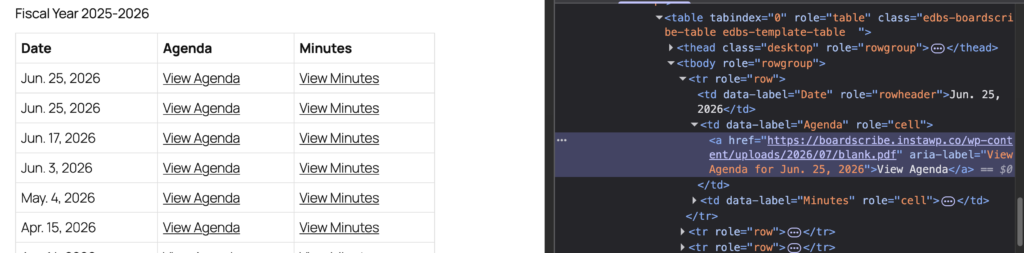
Example code for an agenda link:
<a href="https://boardscribe.instawp.co/wp-content/uploads/2026/07/example.pdf" aria-label="View Agenda for Jun. 25, 2026">View Agenda</a>BoardScribe also has been tested with and integrates with Accessibility Checker fixes, such as new window warnings for links and adding file size and type to links.
Accessible in the admin
We believe that accessibility is not just for website visitors — it’s for website owners and content creators too. As such, we pay attention not only to front-end accessibility, but also to accessibility in the WordPress admin.
BoardScribe’s admin settings pages are fully accessible, except for any issues introduced by WordPress core. Issues identified for WordPress core have been reported to WordPress core.
Our aim is to make the plugin as easy to use as possible for both non-technical users and people with disabilities. You can easily set up and configure BoardScribe with a screen reader.
Adopts theme styles
The front-end components of BoardScribe are not opinionated in their styles and will adopt the design of your theme. This ensures it fits best with your website’s design and supports your website’s color scheme.
Important note: Because BoardScribe adopts your theme styles, if there are accessibility problems in your theme (such as missing link underlines, poor color contrast, etc.), these issues will likely also be present in BoardScribe’s components.
To ensure your website is fully accessible, test it with a tool like Accessibility Checker and consider having it audited by an accessibility professional.
Supports your accessibility efforts
BoardScribe makes it easy to display board meeting minutes and agendas in an accessible manner to support your accessibility efforts.
Accessibility-ready means that the BoardScribe plugin gives you a strong foundation for accessibility without requiring your team to know how to code.
BoardScribe can help make your meeting information more accessible, but the accessibility of the content you publish is still your responsibility. Any documents you upload or link to—such as PDF agendas, meeting minutes, reports, or supporting materials—must also be created and maintained in an accessible format.