
• Skip to main content
  • Skip to footer
Equalize Digital Home

Equalize Digital

Website Accessibility Consulting, Training, and Development

  • My Account
  • Support
  • Checkout
  • Software
    • Accessibility Checker
      • Features: Accessibility Checker
      • Documentation: Accessibility Checker
      • Buy Accessibility Checker
      • Start Free
    • ArchiveWP
      • Documentation: ArchiveWP
      • Buy ArchiveWP
      • Demo All Plugins
  • Services
    • Accessibility Audits
    • User Testing
    • Accessibility Remediation
    • VPAT & ACR Preparation
    • Accessibility Monitoring
    • Web Accessibility Training
    • Accessibility for Agencies
  • Company
    • About Us
    • Our Team
    • Industry Expertise
    • Accessibility Statement
    • Contact Sales
    • Become An Affiliate
  • Learn
    • Online Courses
    • Accessibility Meetup
    • Articles & Resources
    • Accessibility Craft Podcast
    • Upcoming Events
    • Office Hours
    • Custom Accessibility Training
    • Global Accessibility Awareness Day
  • Contact Sales
  • My Account
  • Support
  • Checkout
Home / Learning Center / Website Accessibility Testing Checklist

Website Accessibility Testing Checklist

Article PublishedMarch 5, 2026Last UpdatedMarch 5, 2026 Written byAmber Hinds

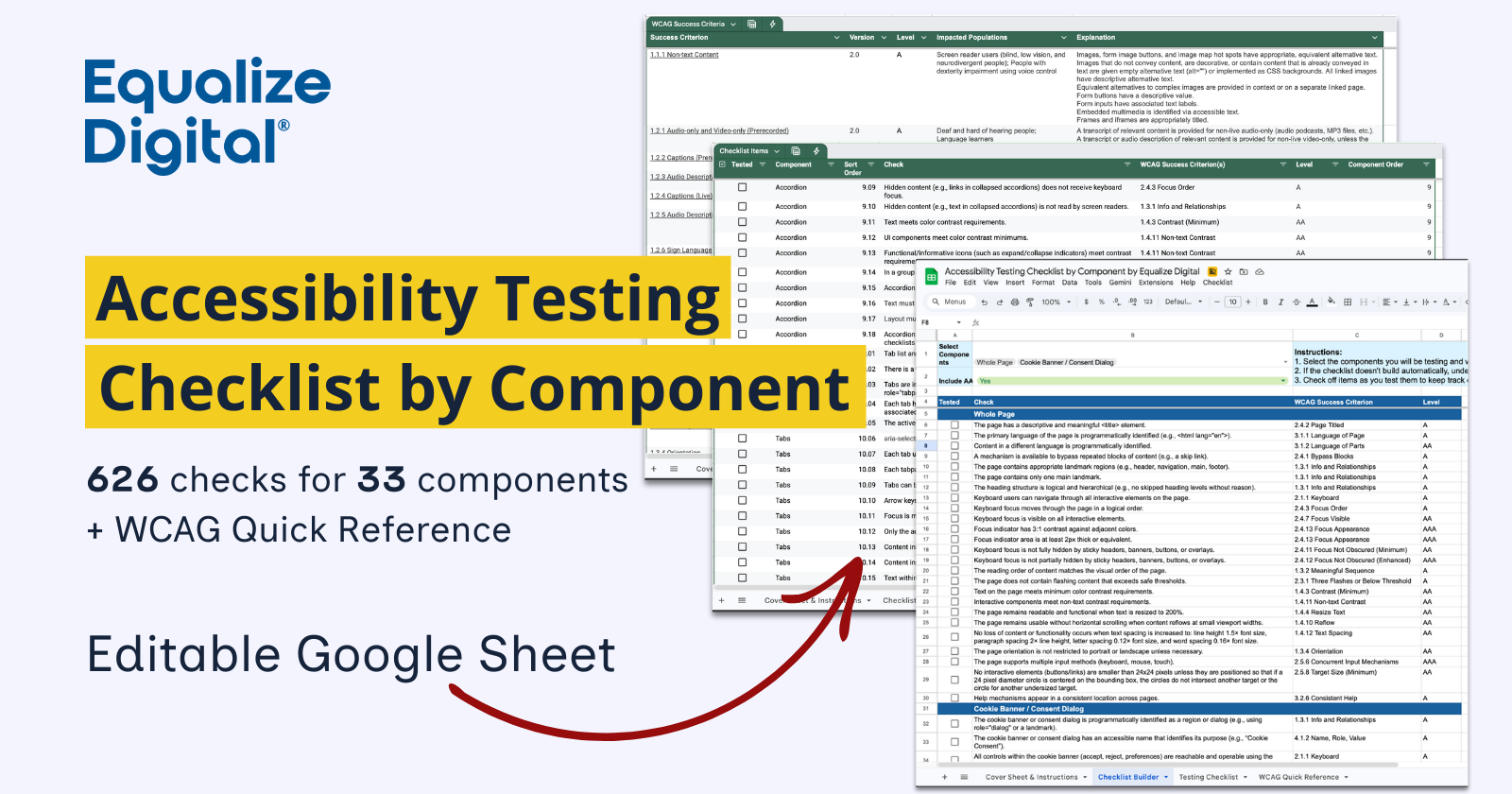
Accessibility Testing Checklist by Component. 626 checks for 33 components, plus WCAG Quick Reference. Editable Google Sheet.

Request access to our Accessibility Testing Checklist by Component Google Sheet, which includes 626 checks for 33 components, a Web Content Accessibility Guidelines (WCAG) Quick Reference, and a checklist building tool.

This checklist helps you build a faster, more consistent process for auditing web pages for accessibility. Instead of guessing what to test, you get a comprehensive checklist by component that maps directly to WCAG success criteria.

Whether you’re auditing a website, evaluating a design system, or training a team on accessibility testing, this tool helps ensure nothing gets missed.

Get the Checklist

Fill out the following form, and we’ll email you a link to the Accessibility Testing Checklist by Component Google Sheet.

Name(Required)
Opt-in(Required)

Inside you’ll find:

  • 626 checks for 33 components: everything from page-level checks to checks for navigation menus, accordions, tabs, form elements, and more.
  • Simple to follow tests: Each check describes exactly what to test, which WCAG success criterion applies, and the required conformance level (A, AA, or AAA).
  • Checks organized by component, making it easy to test web pages one component at a time to ensure nothing is missed.
  • Checklist Builder tool automatically generates a tailored testing checklist for your audit based on the components you select and whether you want to include AAA-level checks.
  • Built-in WCAG Quick Reference sheet that provides WCAG success criteria, Conformance levels, Impacted disability groups, Clear explanations of each requirement, and links to further documentation
  • Editable Google Sheet you can add to or change as needed for your website building process.

How the Accessibility Testing Checklist by Component Helps

This tool supports the way accessibility professionals actually work.

Use it to:

  • Perform full website accessibility audits.
  • Evaluate design systems and component libraries.
  • Train new accessibility testers.
  • Standardize accessibility testing across teams.
  • Ensure consistent WCAG coverage across projects.

Accessibility testing doesn’t have to be chaotic. With our Accessibility Testing Checklist by Component, you get a proven structure that ensures your audits are thorough, repeatable, and aligned with WCAG.

Whether you’re just getting started or are a seasoned tester, this checklist will help you save time on deciding what to test or writing checklists from scratch. Start testing with confidence—and never wonder if you missed something again.

Included Components

The following components are included in this checklist:

  • Page-level checks
  • Cookie Banner / Consent Dialog
  • Landmarks
  • Navigation Menu
  • Breadcrumb
  • Headings
  • Search
  • Search (Modal)
  • Search Suggestions
  • Search Filters / Faceted Search
  • Accordion
  • Tabs
  • Carrousel/Slider
  • Tables
  • Graphics and Charts
  • Images
  • Audio-only content
  • Video-only content
  • Multimedia content
  • Links, Pagination
  • Load More Button
  • Checkbox
  • Select
  • Radio Buttons
  • Animations
  • Modals
  • Tooltips
  • Toggle Buttons
  • Buttons
  • Progress Indicators
  • Alerts / Status Messages / Toasts
  • Draggable Elements
  • Input fields

Copyable, Editable, Shareable, and Private

Because it’s built in Google Sheets, it’s easy to customize for your workflow, collaborate within teams, and track testing progress over multiple testing sessions. You can use the same sheet repeatedly, or copy it for each audit. And because it’s stored on your Google Drive, it’s totally private — no wondering if the checklist built onto a website is tracking you.

Want to improve your testing process? Request access to the Accessibility Testing Checklist by Component Google Sheet today.

Facebook0Tweet0LinkedIn0Shares0

Filed Under: Website Accessibility Testing

About Amber Hinds

Amber Hinds is the CEO of Equalize Digital, Inc., a company specializing in WordPress accessibility, maker of the Accessibility Checker plugin, lead organizer of the WordPress Accessibility Meetup, and Board President of the WP Accessibility Day conference.

Through her work at Equalize Digital, Amber is striving to create a world where all people have equal access to information and tools on the internet, regardless of ability. Since 2010, she has led teams building websites and web applications for nonprofits, K-12 and higher education institutions, government agencies, and businesses of all sizes, and has become a passionate accessibility advocate.

Follow Amber on Twitter · Find Amber on LinkedIn

Post navigation

Making Digital Documents Accessible with Samantha MerrettPrevious post: Making Digital Documents Accessible: Practical Steps for Inclusive Design: Samantha Merrett
Reimagining Accessibility Checker in the Block Editor SidebarNext post: Changelog 011: Reimagining Accessibility Checker in the Block Editor Sidebar

Easier, Faster Accessibility Testing

Equalize Digital Accessibility Checker gives you real-time accessibility feedback in the WordPress editor. Learn accessibility and make fixes earlier in the dev and content creation process. Full-site accessibility scanning without the per page fees.

Get Accessibility Checker

Footer

Equalize Digital Websites for Everyone

Your WordPress accessibility team. Accessibility plugins, rapid audits, and consulting to help you make your website usable by people of all abilities.

  • Facebook
  • GitHub
  • LinkedIn
  • YouTube

Company

  • About Equalize Digital
  • WordPress Accessibility Meetup
  • Accessibility Statement
  • Blog
  • Events
  • Contact Us

Services

  • Accessibility Audits
  • User Testing
  • Remediation
  • Ongoing Monitoring
  • VPAT & ACR Preparation
  • Accessibility Training
  • For Agencies
  • Website Development

Accessibility Checker

  • Features
  • Pricing
  • Documentation
  • How to Get Support
  • My Account
  • Affiliate Dashboard
  • Become an Affiliate

© 2026 Equalize Digital · Privacy Policy · Terms of Service · Software Terms & Refund Policy

International Association of Accessibility Professionals member

Small Business Accessibility Playbook

Learn how to make your website accessible.

Free Ebook: The Small Business Accessibility Playbook for WordPress by Equalize Digital and WP Buffs.

Get a copy of the free e-book via email.

This field is for validation purposes and should be left unchanged.
Name(Required)
This field is hidden when viewing the form
Privacy Policy(Required)
This field is hidden when viewing the form