This post is part of a series where we explain Web Content Accessibility Guidelines (WCAG), an internationally recognized standard for measuring website accessibility. For more posts in this series, visit our Web Accessibility WCAG 2 Knowledge Base.
As our WordPress accessibility series on WCAG conformance continues, we’re exploring a higher-level yet equally important video accessibility requirement: providing sign language interpretation for prerecorded media.
Captions make video content accessible to people who are deaf or hard of hearing, but for many users—especially native sign language users—captions alone are not always sufficient. That gap is addressed by WCAG Success Criterion 1.2.6: Sign Language (Prerecorded), which requires that prerecorded video content with audio include sign language interpretation. This is a Level AAA requirement.
When your WordPress site includes videos such as tutorials, walkthroughs, marketing videos, or interviews, providing sign language interpretation can help to ensure that Deaf users who rely primarily on sign language can fully perceive and understand the content.
In this post, we’ll break down what WCAG 1.2.6 requires, why sign language interpretation matters, common implementation challenges, and practical ways to provide sign language–interpreted video content using WordPress-friendly tools and workflows.
What is WCAG 1.2.6 Sign Language (Prerecorded)?
WCAG Success Criterion 1.2.6 Sign Language (Prerecorded) (Level AAA) states:
Sign language interpretation is provided for all prerecorded audio content in synchronized media.
Web Content Accessibility Guidelines 1.2.6 Understanding Doc
In plain terms:
If a prerecorded video (any video that is not live) contains spoken audio, you must provide sign language interpretation of that audio if you want to meet the highest level of accessibility (AAA).
This requirement goes beyond captions. While captions represent spoken words as text, sign language conveys meaning through a visual, linguistic system that many Deaf users understand more naturally and fluently than written text.
WCAG 1.2.6 does not allow captions or transcripts as substitutes. To meet this success criterion, a sign language interpreter must be visually present and synchronized with the video’s audio content.
Article continued below.
Stay on top of web accessibility news and best practices.
Join our email list to get notified of changes to website accessibility laws, WordPress accessibility resources, and accessibility webinar invitations in your inbox.
Why WCAG 1.2.6 Matters
For many Deaf users, sign language is their primary or first language, and written text may be a second language. Captions can be helpful, but they may not fully convey tone, emphasis, or complex concepts as effectively as sign language.
In many ways, the Deaf experience, for people who grew up speaking sign language as their first language, is similar to what you might experience if you first learned one spoken language and then learned another language later. While you may be able to read and understand the second language, it may take you longer to process it, or it may be more difficult for you to recognize or communicate fine nuances in the second language.
The WCAG 1.2.6 success criterion was created in recognition that some people may be more comfortable consuming spoken content in sign language rather than in written form. The goal of the success criterion is to deliver video content in a language and format that are fully accessible to sign language speakers, while maintaining a consistent experience for all viewers, with or without hearing.
Because this is a Level AAA requirement, not all organizations are required to meet WCAG 1.2.6 Sign Language (Prerecorded) for legal compliance. However, organizations aiming for the highest level of accessibility, those that directly serve Deaf communities, and government entities creating videos for the general public should consider sign language an essential addition to their video content.
How to Meet This Success Criterion in WordPress
If you publish prerecorded video content that includes spoken audio—such as tutorials, interviews, webinars, or marketing videos—WCAG 1.2.6 requires you to provide a sign language interpretation of that audio.
The following section provides recommendations for meeting this success criterion on WordPress websites.
First, Decide How to Present Videos
There are two different ways to display sign language interpretation for your videos. You need to first decide which approach you want to take, because it will affect your video creation process.
Embedded Picture-in-Picture Sign Language
Picture-in-picture sign language interpretation is when the sign language interpretation video is edited directly into the video file. You can see an example of this in the WordPress Accessibility Day 2023 opening remarks, where Amber’s speaker video occupies a large portion of the screen, and an interpreter video is in the bottom-right corner.
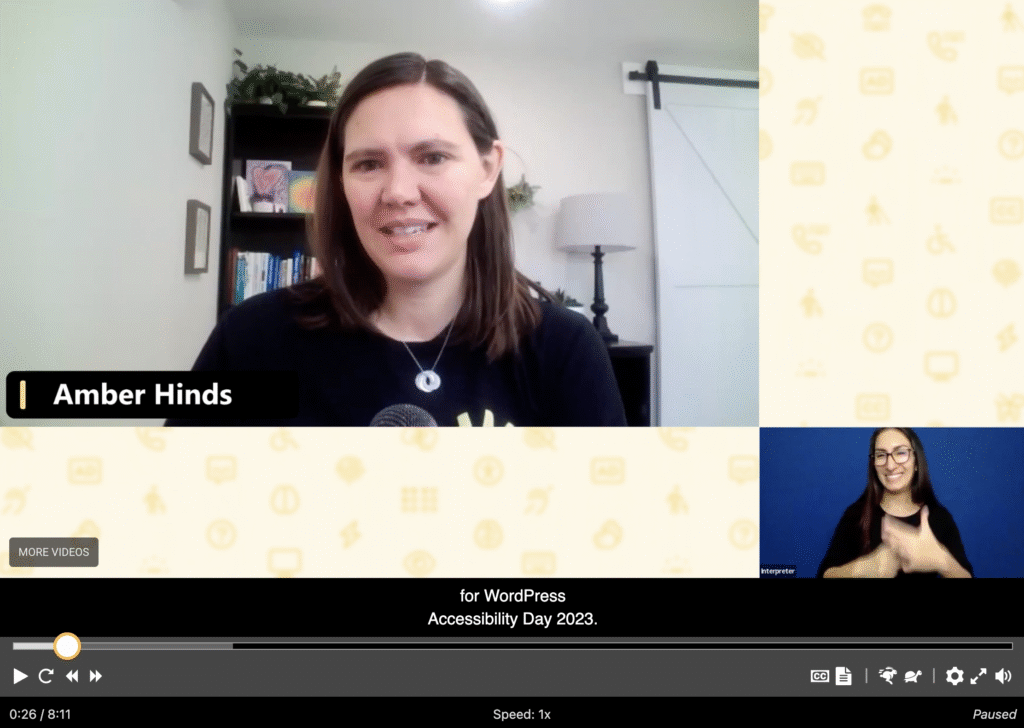
The interpreter video can be offset, as in this example, to ensure that text on conference presentation slides is not obscured. Or it can overlap some of the video, as long as no important content is covered.
Pros to Picture-in-Picture Placement
- There is only one video file to store, load, or manage. This may reduce costs if you’re self-hosting videos.
- A single video with interpretation is easier to watch on small screens, such as mobile devices where you can’t easily split screen multiple videos or browser tabs.
- A single video can be played in any accessible video player. Not all media players support separate sign-language interpretation videos, so this approach will work with a wider range of video players.
Cons to Picture-in-Picture Placement
- Overlaying the interpretation video may cover content in the video.
- The interpretation video is typically very small and cannot be made bigger. In some cases, the video itself will also be smaller. Smaller video and interpretation windows may be difficult for people to see, particularly on small screens or when the video cannot be played full-screen.
- The interpretation video cannot be moved. If you put it in a spot that does not work for the viewer, they cannot reposition it.
- The interpretation video cannot be hidden. This may be distracting for people who do not need interpretation and who find additional movement distracting.
Separate Media Files for the Video and Interpretation
If you use a media player that supports having a separate, synced video for sign language interpretation, you don’t need to have the sign language video edited onto the main video file.
This screenshot of WordPress Accessibility Day 2025 opening remarks shows the main video on the left, with a control to toggle a sign language video on or off. The sign language video is positioned to the right of the main video.
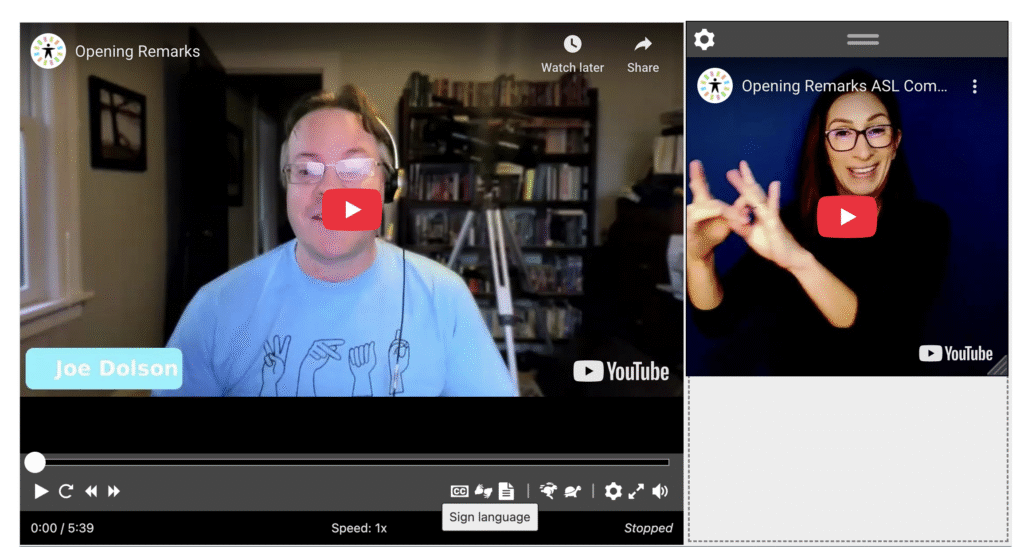
The player in this example is the free Able Player WordPress plugin maintained by Joe Dolson. Visit the WordPress Accessibility Day website to see it in action.
Not only does Able Player support turning separate, synchronized sign language videos on and off, but viewers have full control over the size and positioning of the interpretation video. Here’s the same video with the sign language video larger and positioned differently on the web page, including an overlap onto the main video:

Pros to Having Separate Media Files for Interpretation
- Allows flexible positioning (side-by-side, picture-in-picture, pop-out window) and avoids permanently “locking in” interpreter size or placement decisions.
- Enables larger interpreter display (resizable or full-screen).
- Allows viewers to turn the interpreter on or off as needed.
- Keeps the main video visually clean for viewers who don’t use sign language.
- Supports displaying different sign languages for global audiences.
- Makes it easier to update or replace the interpreter without re-editing the main video.
- Reduces production complexity when creating multiple language versions—fewer edits to the main video can lower production costs.
- Can improve compression quality for both videos (separate encoding).
- Supports user preference and personalization.
Cons to Having Separate Media Files for Interpretation
- Requires a specialized media player that supports video synchronization; popular platforms like YouTube’s native player cannot do this.
- May result in more bandwidth usage as two video streams will be playing.
- More complex UI controls or new player interfaces can be harder for viewers to understand: some may miss the interpretation video if they don’t know how to enable it.
Which approach is best?
At Equalize Digital, we recommend providing sign language interpretation as a separate, synchronized video rather than embedding it directly into the primary video file.
As noted above, a separate file provides organizations with greater flexibility and lower editing costs, supports user choice, allows the interpreter to be resized or repositioned, and makes it easier to update or localize interpretation without re-editing the original content. While it requires thoughtful implementation to maintain synchronization and accessibility, the separate-video approach better supports personalization and long-term content management.
Creating Videos With Sign Language Interpretation
Once you have decided how you want to display interpretation with your videos, the next step to meeting 1.2.6 Sign Language (Prerecorded) is to create videos with sign language interpretation.
For most of us, that means hiring a qualified sign language interpreter to produce a separate interpretation video and then synchronizing it with the video’s audio.
Pre-Existing Videos
If you are remediating existing videos to enhance accessibility, you typically just need to find a vendor and send them your videos. They will either deliver a separate video file showing only the interpreter standing in front of a plain background, or some companies may edit the interpretation view onto the video file you sent if requested.
New Videos
If you are planning to add sign language interpretation to an upcoming video (that you have not yet recorded), one thing to ask yourself is what kind of video is it?
If the video you plan to add to your website will start as a webinar or livestream, it may be best to have your interpreter join the webinar or livestream and record interpretation in real time. This makes the live video more accessible, may reduce editing costs, and can shorten the production time between the live event and when you publish the final video to your website.
Zoom is a webinar platform that makes it easy to have a sign language interpreter and delivers separate recording files for the interpreter and the main video, giving you ultimate flexibility in displaying later. More on interpretation on Zoom.
Considerations for Sign Language Interpretation Videos
Choosing the Right Language
There are approximately 300 sign languages in the world. Different countries or communities have different ways of communicating words or phrases in signs. Sign languages are not universal. Make sure you choose the right sign language for your audience.
Finding an Interpreter
There are several ways you can find a sign language interpreter. Here are some recommendations:
- Ask in your network for a recommendation. If a conference or event you’ve attended used interpreters, you may be able to find out the vendor from the event organizers. Finding an interpreter who has worked with someone you know can frequently be the best way to identify a trusted company or person.
- Check for a government registry in your local area. Many U.S. states or other governments outside the United States license, certify, or maintain rosters of approved interpreters. These lists are intended for government or legal needs; however, the general public can also use them to find trusted interpreters.
- Search for professional interpreter associations in your country. Several professional associations represent individuals and companies that offer sign language interpretation services. These associations often have public member directories or can provide you with a list of recommended providers in your area. Examples of these associations include:
- Association of sign language interpreters and guide-interpreters of Catalonia (ACILS)
- Association of Sign Language Interpreters and Translators (United Kingdom)
- Australian Sign Language Interpreters and Translators Association
- Canadian Association of Sign Language Interpreters
- French Association of Sign Language Translators and Interpreters (in French)
- Registry of Interpreters for the Deaf, Inc. (United States)
- Swedish Association of Sign Language Interpreters (STTF)
- World Association of Sign Language Interpreters
- Ask Deaf Associations for referrals. Many nonprofit or government-funded associations for the Deaf maintain lists of trusted interpreters you can contact. If there isn’t a sign language interpreter association in your area, check for an association that supports the Deaf community.
How to Implement Sign Language Interpretation in WordPress
Once you have your video files, the next step is to get them on your website. There are several ways to provide sign language interpretation for videos in WordPress.
Best: Use a Video Player That Supports Multiple Video Sources
The Able Player plugin, described above, is a great free way to achieve this experience in a WordPress website and supports videos hosted on YouTube, Vimeo, or locally. Able Player is an open-source project that can also be used on non-WordPress websites. This is our go-to recommendation for media players.
Another player to consider is Scribit.Pro. This is a paid video hosting software from a company that also provides interpretation services. Their embedded players support separate synced videos for sign language interpretation.
Add Sign Language Directly on the Video
If your player does not support separate interpretation videos, you can edit the interpretation on the main video, as described above, and embed that single video on your website.
What if you want to allow users to view the video with or without sign language interpretation?
Creative Ways to Switch Interpretation “On” and “Off”
If you aren’t using a player that supports sign language interpretation controls, you can still provide an experience that lets website visitors view the video with or without interpretation. To do this, you only need to:
- Create two versions of the video (interpreted and not interpreted).
- Come up with an accessible and visually appealing way to allow people to switch between the two videos.
Acceptable approaches include:
- Tabs: One tab for the standard video, one for the sign language–interpreted version.
- Accordions: Allow users to expand the version they want to watch.
- Links: Provide a clearly labeled link immediately after the video to a sign language–interpreted version on another page.
If taking this approach, all controls and navigation must be keyboard accessible and screen reader-friendly.
WCAG 1.2.6 Exceptions
If you want to meet Level AAA accessibility, there are limited scenarios where WCAG 1.2.6 does not apply:
- No audio content: Videos with no spoken audio do not require sign language interpretation.
- Live video content: WCAG 1.2.6 applies only to prerecorded media. Sign language interpretation for live streams is not required to pass this success criterion.
Testing WCAG 1.2.6 Compliance in WordPress
1. Identify prerecorded videos with spoken audio.
Review all pages and posts on your WordPress site to identify prerecorded videos with spoken audio. Tools like Accessibility Checker Pro can help locate video content across your site.
Use Accessibility Checker Pro to run a full-site scan and review the report for “A Video is Present”, then go to each page and play the video to see if the video has spoken audio.
Exclude videos that:
- Are decorative
- Contain only music or other sounds and no spoken audio
- Are live streams
2. Check for sign language interpretation.
Confirm that each applicable video includes a visible, synchronized sign language interpretation—either embedded or provided as an alternative version.
3. Verify accessibility of the implementation.
Ensure that:
- Users can easily find the sign language–interpreted version. It should be clearly labeled or use a recognizable icon.
- Controls are keyboard accessible. Someone who cannot use a mouse should be able to view or enable the interpretation.
- Labels clearly identify which version includes sign language.
4. Test with real users
If the interpretation was created for you by a third party and you don’t speak or understand sign language, consider getting the interpretation reviewed by a Deaf person or native speaker of that specific sign language.
Bringing in real sign language speakers will help you confirm that the vendor you used delivered a high-quality interpretation and also that the implementation of it on your site meets their needs.
Start Making Your WordPress Site Accessible Today
WCAG 1.2.6 Sign Language (Prerecorded) ensures that Deaf users who rely on sign language can fully perceive video content that includes spoken audio.
While this is a Level AAA success criterion, implementing sign language interpretation demonstrates a strong commitment to accessibility and inclusion—especially for organizations serving Deaf communities.
Start with high-impact content such as tutorials, educational materials, and public-facing videos. Plan for interpretation early, choose flexible video players, and ensure your WordPress implementation makes the interpreted content easy to find and use.
Each sign language–interpreted video brings your site closer to truly inclusive accessibility—and ensures your content communicates clearly to everyone.