Have questions about Equalize Digital courses? Read below for answers to FAQs.
Purchase Information and Refunds
When you purchase a course, you will have lifetime access to the course and all supplemental information, as long as it is available on our website. If we update a course in the future with new or corrected materials, you will have access to the updated course at no additional cost.
Please don’t share your login for courses.
Creating quality courses with detailed videos and supplemental materials takes us hundreds of hours. We feel our courses are reasonably priced for their value, and we appreciate you purchasing them separately for everyone who needs access. Additionally, when you share access to a course among multiple team members, there isn’t any way to track individual users progress.
We’re happy to offer a discount to teams purchasing multiple licenses. Please contact our sales team with information about the number of licenses you need, and we’ll work out the details with you.
Yes. We offer a 10% discount on all products and services to 501(c)(3) nonprofit organizations. Apply for a nonprofit discount here.
We offer refunds on courses within 30 days of purchase as long as you have not watched any of the videos in the course. Once the videos (or some number of the videos) have been watched, then you are no longer eligible for a refund.
To request a refund, submit an account/billing support request in your Equalize Digital account.
Support is included for the usage of our course platform or for difficulty accessing courses or materials. We are happy to provide alternative materials if something does not work for your assistive technology.
For accessibility or course platform support, submit an account support request here.
Course support does not currently include open-ended Q&A or answers to questions about the provided materials. If you would like additional information about the provided materials or lessons, here are your options:
- Book a personalized training session.
- Contact sales to purchase a la carte consulting hours.
- If you have an Accessibility Checker Small Business or Agency license, come to office hours to ask questions on any accessibility topic, including courses. These Zoom meetings are included free with those licenses.
Course Platform
Our courses are online with videos and supplemental learning materials that include accessible, tagged PDFs, Google Docs, Google Sheets, and links to relevant web pages. Videos are 2-15+ minutes long. All videos are captioned and include full transcripts. Some videos include suggested activities before proceeding to the next video.
Courses are accessed through your My Equalize Digital Account. Each video and its related materials can be found on its own page, and your progress will be tracked as you move through the course. Here’s an example of a lesson page within a course:

Courses are self-paced, meaning you can watch videos and complete exercises when it works best for you. All videos are available immediately when you purchase the course (nothing is “dripped” over weeks or months).
After you purchase a course, you will have access to the course materials immediately in your Equalize Digital Account. Links to the specific course can be found on the order confirmation screen and in your emailed receipt.
You access courses directly from the courses page here.
We have done our best to create courses that are fully accessible and WCAG 2.2 AA conformant.
Our course platform is built on LearnDash, which we have audited and for which we have prepared an Accessibility Conformance Report (ACR). Read the LearnDash ACR here.
In addition, we have made further enhancements to the LearnDash platform to support accessibility on our own website better, and we follow accessibility best practices when creating course content.
Accessibility features in our courses include:
- All videos are captioned and have full transcripts.
- Videos use Vimeo’s video player, which includes accessible controls.
- Any provided PDFs are tagged.
- Any provided Google Docs have appropriate headings, semantic markup, image alternative text, and meaningful link text.
- Course progression (moving between lessons, marking them complete, etc.) can all be completed with a screen reader and include appropriate screen reader announcements.
If you need assistance or would like to request an alternate format for the content, please contact us. For accessibility support, submit an accessibility support request here.
To move forward in the course to the next lesson, you must first do two things:
- Watch the entire video all the way to the end.
- Click one of the two “Mark Complete” buttons on the lesson.
The “Mark Complete” buttons can be found here:
- As the last element in header (
bannerlandmark). - In the
mainlandmark after the video and any text, between the “Previous Lesson” and “Next Lesson” links.
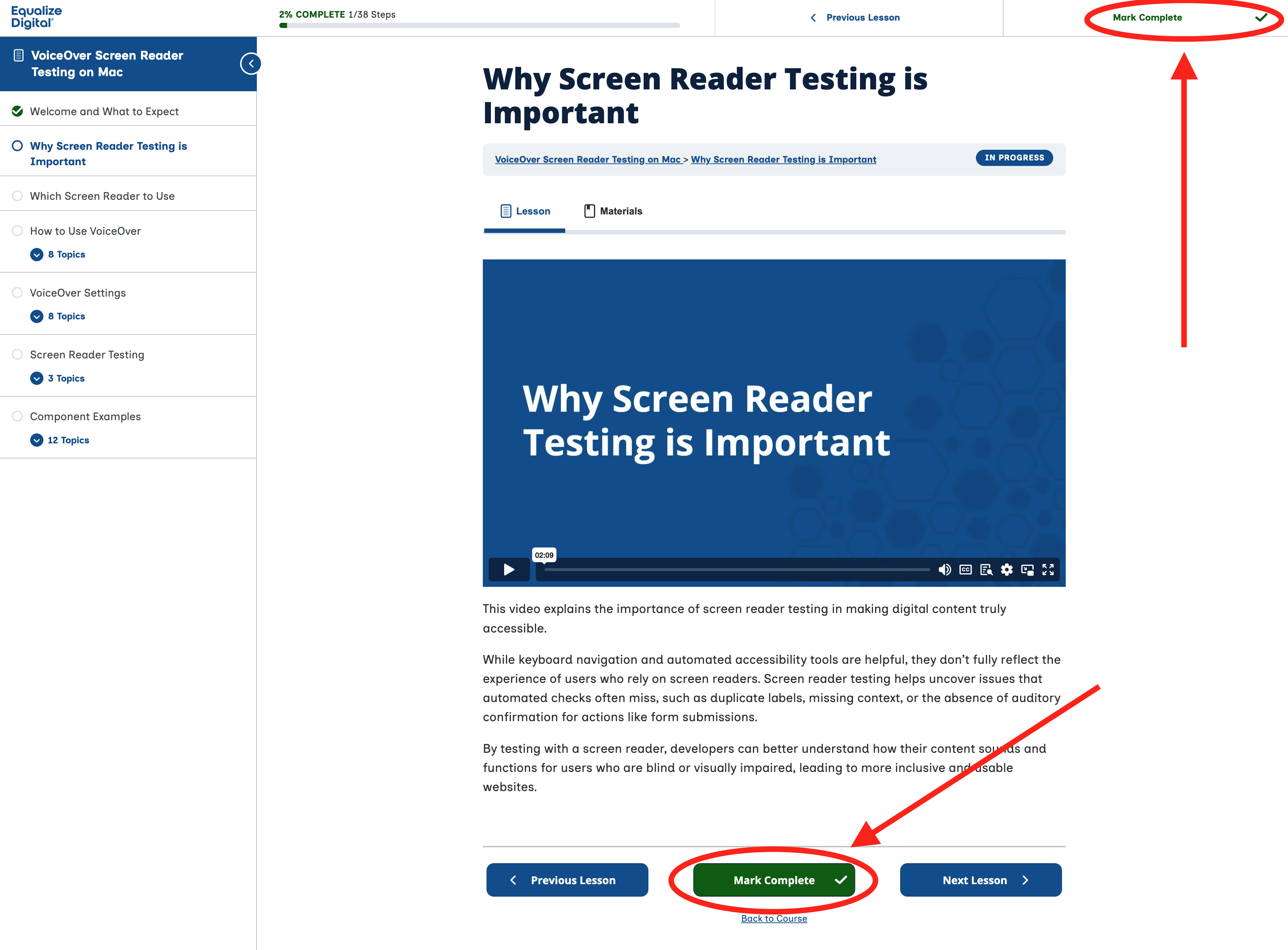
Note: The “Mark Complete” buttons will be disabled until you have watched the entire video to the end. If you stop the video early or do not watch it at all, these buttons cannot be interacted with.
After marking a lesson complete, you can proceed to the next lesson.
If you cannot mark a lesson complete, that usually means that you have not watched the video all the way to the very end. Please try watching it all the way, without stopping it early and see if the button becomes available.
When you’re viewing a lesson, if you want to return to your My Equalize Digital Account dashboard, you can do it in several places:
- Click the Equalize Digital logo link in the top left corner of the header (
bannerrole) to go back to the dashboard home page. - Click the linked name of the course in the course navigation to go back to the main course page.
- Click the “Back to Course” link below the “Mark Complete” button near the end of the
maincontent.
At this time, our course platform does not automatically generate certificates of completion because we don’t have a reliable way to generate on-demand accessible, tagged PDFs. This is something we hope to address in the future.
In the meantime, if you would like to show proof of completion, there are two options:
- Screenshot the course to share it as needed.
- Contact us after you have completed the course, and we can create an accessible, tagged PDF certificate for you for $50.